Defining Automation in Preschool Management
Automation in preschool management means using software to trigger, route, and document routine operational work with minimal manual effort.
In simple terms: it’s “if X happens → do Y automatically.”
- If a parent requests a tour → the system confirms, offers time slots, and sends a reminder.
- If tuition is due → the system invoices, attempts autopay, and sends a receipt.
- If a child is checked out early → the system records it and alerts the right staff member.
This is the heart of preschool workflow automation and preschool process optimization—making work consistent and repeatable.
What automation does not do
- It won’t fix broken processes by itself. Automation will just speed up inconsistency if your admissions process varies every time.
- It won’t replace human judgment. Sensitive topics and child safety decisions still need people.
- It won’t automatically standardize your data. You must define required fields before automation can work cleanly.
Preschool leaders are pushing for automation because admin tasks keep getting more complex—more documentation, more communication expectations, more reporting needs—without extra hours in the day. If you’re seeing that pressure firsthand, it can help to review how preschools can reduce administrative overload with digital systems as a starting point for where automation delivers the fastest relief.
The High-Friction Operational Areas (What to Automate First)
If you want quick wins from preschool workflow automation, start where the work repeats often and mistakes are costly. These are the friction zones that slow teams down and create parent complaints.
Admissions & enrollment
Where friction shows up:
- Missed inquiry follow-ups
- Back-and-forth tour scheduling
- Lost forms in email threads
- Waitlist confusion
How preschool process optimization helps:
- Capture inquiries automatically
- Standardize lead stages (new inquiry → toured → applied → enrolled)
- Generate packets and checklists without manual copying
Attendance & ratios
Where friction shows up:
- Paper sign-in sheets
- Last-minute ratio checks
- Staff hunting for accurate rosters
- Manual correction after the fact
How automation helps:
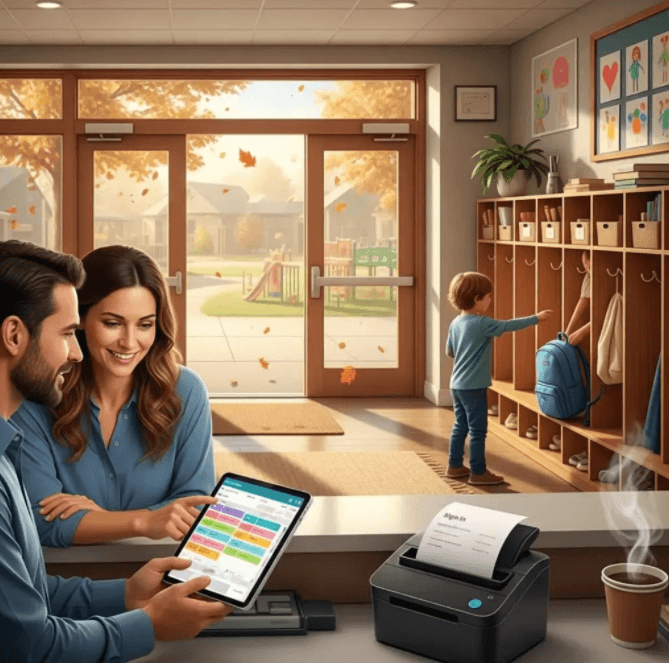
- Digital check-in/out with timestamps
- Real-time roster views
- Alerts for anomalies (like a no-show or early pickup)
If attendance and daily logs are a major pain point, you may also want to explore digital recordkeeping for preschools (automating attendance, reports & daily logs) to see how centers structure this shift without creating new gaps.
Billing & payments
Where friction shows up:
- Manual invoices
- Parents missing due dates
- Time wasted on payment chasing
- Reconciliation headaches
How automation helps:
- Recurring invoices
- Online payments/autopay
- Automatic reminders and receipts
Parent communication
Where friction shows up:
- Repeating the same messages daily
- Forgetting to send reminders
- No record of what was sent and when
How automation helps:
- Message templates
- Scheduled broadcasts (closures, reminders, events)
- Targeted notifications to the right group
If you’re refining these workflows, detailed feature examples in communication tools for preschools can help you map what should be templated, scheduled, and logged for transparency.
Staff scheduling
Where friction shows up:
- Last-minute substitutions
- Shift confusion
- Time tracking gaps
How automation helps:
- Shift templates
- Sub request workflows
- Centralized visibility
Compliance documentation
Where friction shows up:
- Missing details on incident forms
- Medication logs that are hard to read
- Scrambling before inspections
- Searching through folders for proof
How automation helps:
- Required-field e-forms
- Electronic signatures
- Organized, searchable storage for audits
In 2026, growing demands—compliance expectations, parent communication standards, and documentation load—are pushing owners to streamline these workflows before they become a daily bottleneck.
Why 2026 Is the Tipping Point
Preschools aren’t suddenly “getting busy.” They’ve been busy for years. What’s changing is the level of operational complexity and the expectation that everything is trackable and fast.
In 2026, directors are leaning into automation in preschool management because:
- Admin work keeps expanding.
- Staff stress rises when teachers and admins carry “extra duties.”
- Small errors (missed reminders, missing forms, wrong invoice amounts) create big parent trust issues.
Preschool workflow automation wins because it makes your operations:
- Trackable: You can see who did what, when.
- Consistent: Same steps happen every time.
- Faster: Fewer handoffs and less retyping.
- Less error-prone: Reduced manual entry reduces mistakes.
How automation meets looming challenges
Automation helps centers handle common 2026 pressure points:
- Documentation volume: forms, signatures, logs, and retrieval
- Parent satisfaction: quicker responses, fewer surprises
- Compliance audits: clean records you can pull in minutes
- Staff stability: less chaos, clearer routines, fewer “where is that form?” moments
Step-by-Step Examples of Preschool Workflow Automation
This section shows what automation looks like in real life. Use these as “starter templates” for preschool process optimization and digital preschool operations.
A) Inquiry-to-enrollment pipeline (from interest to enrolled, without leaks)
Goal: respond fast, keep momentum, and avoid losing families because follow-ups were missed.
A strong workflow:
- Website form submission
Parent submits interest form (start date, age, schedule needs). - Lead record is created automatically
The system stores the inquiry, tags it by desired start date, and assigns an owner. - Auto-confirmation + tour scheduling
Parent gets an instant confirmation plus a simple way to book a tour. - Auto-reminder if no tour is booked
If there’s no booking after 48 hours, the system sends a gentle reminder. - Post-tour application checklist
After the tour, the system sends a checklist with deadlines (application, documents, fees). - Enrollment packet is generated
Once approved, the system produces an enrollment packet (policies, consents, health form requirements).
Why this matters in 2026:
- Faster response time reduces “lead leakage.”
- Cleaner stages improve occupancy forecasting.
- Staff don’t waste time rebuilding the same email threads.
If you want to bring extra discipline to this flow, it helps to align your intake and documentation with privacy standards used for children’s data. Many centers look to clear COPPA expectations around notice and consent as a benchmark mindset when handling child-related information online.
See also: Algebra Study Assistance Making Math Manageable and Fun
B) Billing automations (predictable cash flow without constant chasing)
Goal: reduce awkward conversations and stop spending staff hours on repetitive billing tasks.
A practical billing automation setup:
- Recurring invoices are created weekly or monthly
- Autopay runs on a fixed date (for families who opt in)
- Reminder messages go out before and after due dates
- Receipts are sent automatically and stored in the parent portal
Outcomes you should expect:
- Shorter “days-to-cash”
- Fewer overdue balances
- Less manual reconciliation work
- Clear payment history when questions arise
C) Digital attendance & real-time notifications (better ratios, cleaner records)
Goal: know who’s in the building right now—without guesswork.
A strong attendance automation flow:
- Digital check-in/out creates automatic timestamps
- A live roster updates instantly for classroom counts
- Alerts trigger for anomalies:
- no-show when expected
- unexpected pickup time
- attendance pattern changes
Result:
- Faster daily reporting
- Better ratio compliance
- Cleaner documentation during licensing visits
D) Incident & medication logs (compliance + parent trust)
Goal: reduce missing details and make records easy to retrieve.
A solid documentation automation flow:
- Guided e-forms with required fields
- Electronic signatures so nothing waits in a backpack
- Organized storage by child, classroom, date, and type
Result:
- Fewer compliance gaps
- Consistent parent communication
- Faster retrieval during audits
If you’re building these forms digitally, it helps to implement data safeguards like encryption and access controls—practices aligned with well-known security controls for protecting sensitive information so you’re not trading speed for risk.
“Don’t Automate Chaos” – The Importance of Preschool Process Optimization
Here’s the truth that saves money and sanity:
Don’t automate chaos.
Automation amplifies whatever you already do. If your workflow is unclear, automation will scale confusion faster.
That’s why preschool process optimization has to come before (or at least alongside) automation in preschool management.
Standardize first: what “ready for automation” looks like
Before you automate, you need:
- A consistent set of steps (even if it’s simple)
- Clear “required information” fields
- Defined handoffs and approvals
Automation readiness checklist (use this before building any workflow)
- Define the workflow owner
Who is accountable end-to-end (not “everyone”)? - Identify required data fields
What must be collected every time? - Outline steps and approvals
Which steps are non-negotiable? - Address exceptions
What happens when a payment fails, a parent doesn’t respond, a family no-shows a tour, or a child is absent unexpectedly? - Confirm final outputs
What does “done” mean (receipt sent, record saved, report updated)?
If you do this first, automation becomes simple. If you skip it, automation becomes expensive.
Digital Preschool Operations End-to-End (Connected, Not Scattered)
In 2026, the goal isn’t “more apps.” The goal is digital preschool operations where information flows smoothly:
inquiry → enrollment → billing → attendance → documentation → reporting
When data is connected, your team doesn’t retype the same child info five times. Parents don’t get conflicting messages. And leadership can actually see what’s happening without digging through inboxes.
Why a preschool management hub matters
A modern preschool management system acts like the center’s operating system. It becomes the hub for:
- Parent records and permissions
- Billing and payment status
- Attendance and rosters
- Messaging history
- Reports for leadership and compliance readiness
When you’re evaluating tools, it’s worth understanding how a connected hub reduces duplicated work and makes automation easier to maintain. This is exactly why many owners start by upgrading to a centralized preschool management system that ties daily workflows together.
Security, Privacy, and Trust
Automation often means centralizing more sensitive information in one place. That’s a good thing for consistency—but only if it’s protected properly.
This is where safe & secure preschool automation, automation in preschool management, and digital preschool operations overlap. You want speed and systematic security.
What data needs protection in preschools
Common sensitive records include:
- Child profiles and health details
- Allergy and medication info
- Incident reports and injury notes
- Custody and authorized pickup lists
- Payment details and billing history
- Messaging history with families
Safeguards to require (non-negotiables)
When choosing tools—or configuring your current system—look for:
- Role-based access (staff only see what they need)
- Encryption (in transit and at rest)
- Audit logs (who viewed/changed records and when)
- Backups + disaster recovery
- Consent management (photos, pickups, messaging permissions)
- Data retention + deletion controls
If you want a practical breakdown of what “secure automation” should include, use safe & secure preschool automation guidance to compare vendor features and ask better security questions.
Implementation Plan & Best Practices (Roll Out Without Disruption)
A common mistake is trying to automate everything at once. That overwhelms staff and confuses parents.
A better approach: phase in automation in preschool management with one workflow at a time, then expand.
Phased rollout approach
- Pick one high-friction workflow
Good starters: billing reminders, attendance check-in/out, or inquiry-to-tour scheduling. - Pilot in one classroom or one site (2–4 weeks)
Keep the test small so you can see issues early. - Train staff on the new workflow and exceptions
Teach not just the “clicks,” but what to do when something goes wrong. - Onboard parents with a simple guide
A one-page “how it works now” sheet reduces support messages. - Expand only when metrics show stability
Then roll it out across the whole center.
Staff buy-in (make it real, not theoretical)
Staff buy-in comes from two things:
- Less daily friction
- Clear support when something breaks
Practical ways to build buy-in:
- Do micro-trainings (10–15 minutes) by role
- Create cheat sheets for common tasks
- Explain the “why” in plain language
When staff feel the change makes their day easier, adoption follows. If you’re formalizing training so the rollout doesn’t stall, a step-by-step roadmap to digitizing your preschool (adoption, training & scaling) can help structure the phases, responsibilities, and support plan.
KPIs & Measuring Success
You can’t improve what you don’t measure. The point of preschool workflow automation isn’t “more technology.” It’s better outcomes: time saved, fewer errors, faster responses, and stronger compliance readiness.
Track these preschool process optimization metrics before and after automation:
Key KPIs to monitor
- Admin hours saved per week
Measure how long enrollment follow-ups, billing tasks, and documentation take now vs later. - Payment collection time + overdue rate
Look at days past due, number of overdue accounts, and time spent on payment follow-ups. - Parent response and issue resolution time
Track average time to reply to messages and complete enrollment steps. - Attendance accuracy
Count mismatches or needed roster corrections. - Compliance readiness
Measure time to retrieve an incident report, medication log, or attendance records.
Simple accountability rule: Compare KPIs pre-automation vs post-automation at 2 weeks, 4 weeks, and 30 days after full rollout.
Where a Preschool LMS Fits
Operations automation keeps the center running. Learning tools help children grow and help parents stay engaged.
That’s where a preschool learning management system fits into digital preschool operations. While admin automation focuses on enrollment, billing, attendance, and documentation, an interactive LMS supports:
- Sharing learning updates and classroom activities
- At-home reinforcement
- Progress tracking and consistent learning-goal communication
If your center is building a more connected digital experience, a Preschool Learning Management System that complements daily operations can help connect what happens in the classroom with what families see at home—without adding more manual admin work.
Tool & Vendor Evaluation Checklist
Choosing the right platform matters because the wrong tool creates new silos and extra work. A strong solution should support both automation in preschool management and reliable day-to-day execution for staff.
Use this checklist when evaluating vendors:
Workflow breadth (does it cover what you need?)
- Enrollment + admissions
- Billing + payments
- Attendance + rosters
- Parent communications
- Documentation + forms
- Reporting
Configurability (can it match your SOPs?)
- Can you customize steps and required fields?
- Can you build approvals?
- Can you handle exceptions without messy workarounds?
Integrations (does it connect to your stack?)
- Payment processing
- Accounting exports
- Messaging/notifications
- Form tools (if needed)
Mobile usability (critical for teachers)
Teachers need to complete tasks quickly. If it’s clunky on mobile, it won’t stick.
Security (don’t compromise to gain speed)
- Encryption
- Role-based permissions
- Audit logs
- Backups and recovery
- Retention/deletion controls
Training and support
- Is onboarding included?
- Do they provide role-based training?
- Is support responsive when something breaks?
A robust tool supports a cohesive, low-friction workflow—so your digital preschool operations actually feel connected instead of scattered. If you want a feature-by-feature lens for comparing options, this guide to choosing the right preschool software can help you pressure-test fit, usability, and long-term maintainability.
Conclusion: 2026 Is the Year to Simplify and Standardize
In 2026, automation in preschool management is becoming the default strategy for directors who want predictable, high-trust operations. With smart preschool workflow automation, you can reduce admin hours, prevent missed steps, and give parents a smoother experience—without adding headcount.
The best results come from pairing automation with preschool process optimization:
- Standardize workflows first
- Automate the repeatable steps
- Train staff in small chunks
- Measure outcomes with clear KPIs
And when you build toward true digital preschool operations, a connected preschool management system becomes the foundation—linking inquiry, enrollment, billing, attendance, and documentation in one reliable flow.
If you want to be future-ready, don’t wait for operations to feel unmanageable. Start with one high-friction workflow, make it consistent, automate it securely, and expand from there.
FAQ
Q: What is preschool workflow automation?
A: Preschool workflow automation uses software to handle repetitive tasks like enrollment, billing, and attendance so staff can focus on high-value interactions with children and families.
Q: Will automation replace teachers or directors?
A: No. Automation handles admin tasks, not teaching or human decision-making. It supports staff by reducing busywork so they can provide more personal attention to children.
Q: How do we protect sensitive data when automating?
A: Require role-based access, encryption, audit logs, and secure backups. Choose platforms with strong security practices, including clear policies for data retention and deletion.
Q: What if parents resist new technology?
A: Provide a simple explanation of how it benefits them—faster communication, fewer forms, easier payments. Small how-to guides also help parents adopt new processes confidently.
Q: Which workflow should we automate first?
A: Start with your biggest pain point. Admissions, attendance, or billing are common areas where quick wins build momentum for broader adoption.